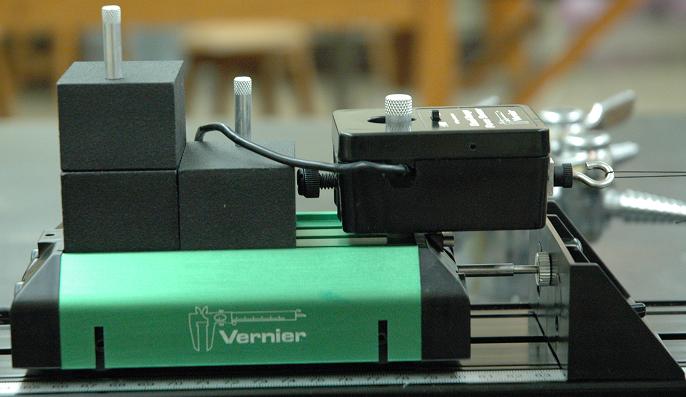
Transition notes:
- The following can be left out from the previous lab (2215 Lab 5: Forces)
- Both Cart Mass - 500g (Vernier) but keep in mind you will need to add another one for this lab (for a total of 3)
- Cart Track - 2.2 meter (Pasco)
- Medium Universal Clamp
- Dynamics Cart (Vernier)
- Electronic Balance - 2000g, 0.1g readability
- Elevation Clamp
- Force Sensor (Vernier)
- LabPro Interface
- LabPro Interface Power Supply
- Screw, Thumb - Vernier Cart Mounting Short
- Both Track End Stops
- Both Track Feet Brackets
- All four Track Feet
- USB-A to USB-B Cord
- Wing Nut (you will need another one for this lab, for a total of 2)
- Don't forget to sweep! Please!
Equipment List:
- Computer - 2000 level Desktop
- USB-A to USB-mini USB cord
- LabPro Interface
- LabPro Interface Power Supply
- Motion Detector (Vernier) (DIG/SONIC 1)
- Motion Detector Cord (Vernier)
- Wooden Block
- 2.2 Meter Cart Track
- 2 x Track Feet Brackets
- Each bracket needs to have 2 x Track Feet in each bracket (so FOUR feet total)
- 2 x Track End Stops (one for either end)
- Elevation Clamp
- Rod - 45cm
- Universal Clamp - Medium
- Vernier Dynamics Cart
- 3 x 500g Cart Mass
- Screw, Thumb-Verneir Cart Mounting Short
- Screw, Thumb-Verneir Cart Mounting Long
- Wing Nut
- Force Sensor (Vernier)
- Force Probe Post Vernier
- Track Pulley
- Ruler, Metric - 30cm
- 150 cm String
- Mass Hanger 50g
- Hanging Mass Holder
- Mass Set with the following masses:
- 1 x 10g Mass
- 2 x 20g Mass
- 2 x 50g Mass
- 1 x 100g Mass
- 2 x 200g Mass
- 1 x 500g Mass
General class use:
- Electronic Balance
- Start the Logger Pro file "Lab 6a.xmbl" in the Lab 6 folder of Class Notes. Click "Collect" push and pull the force sensor hook and see if the force is displayed on the graph.
Notes and tests:
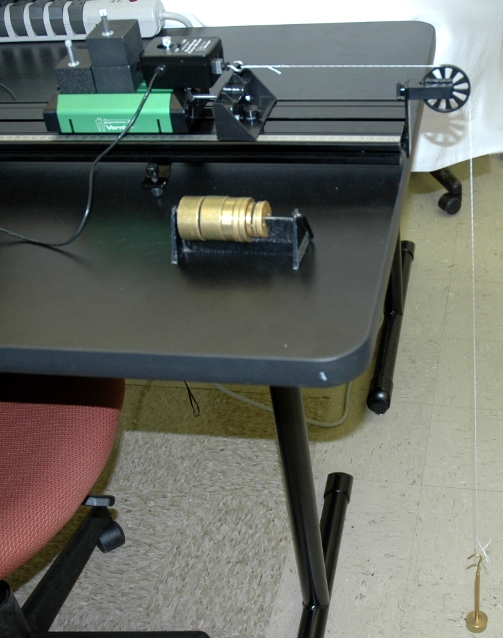
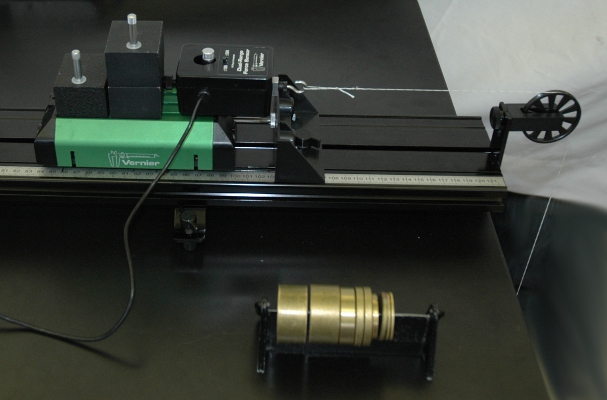


![[HOME]](https://www1.phys.vt.edu/~demo/images/Mis/home2.GIF)
![[PREV]](https://www1.phys.vt.edu/~demo/images/Mis/arrow2.GIF)
![[PREV]](https://www1.phys.vt.edu/~demo/images/Mis/arrow.GIF)
![[PREV]](https://www1.phys.vt.edu/~demo/images/Mis/arrownew.gif)